The construction industry often treats "Substantial Completion" as the finish line of a marathon. Trophies are distributed, ribbons are cut, and the project team disburses to the next job. However, for the building owner and the facility management (FM) team, this moment is not the finish line; it is the starting gun for an ultramarathon that will last 50 to 100 years.
The operational phase of a building represents the single largest financial commitment in the asset's lifecycle, dwarfing the initial capital investment of design and construction. Yet, the traditional handover process—a chaotic "data dump" of cardboard boxes filled with unorganized paper manuals, warranties, and disconnected PDF drawings—sets the operations team up for immediate failure. This antiquated process forces facility managers to spend their first year "rediscovering" the building they just bought, manually re-entering data into maintenance systems while warranties tick away.
This comprehensive guide, the final article in our Lifecycle of Information series, fundamentally shifts the focus from building to operating. We will explore the staggering economics of the Total Cost of Ownership (TCO) and how the "Interoperability Tax" bleeds budgets dry. We will dismantle the traditional concept of "As-Builts," proposing a new paradigm of Artifacts vs. Constants. We will provide a technical roadmap for specifying and creating a true Record Model—a "Digital Twin" that serves as a spatial index for all building data. Finally, we will detail the integration of BIM with Computerized Maintenance Management Systems (CMMS) and explore strategies to prevent "Digital Decay," ensuring the model remains a living, breathing asset for decades to come.
The Cost of Ownership: The 85% Reality
To understand why BIM is mission-critical for operations, we must first look at the cold, hard financial reality of the built environment. There is a fundamental misalignment in how the industry values construction data versus how that data is actually consumed over time.
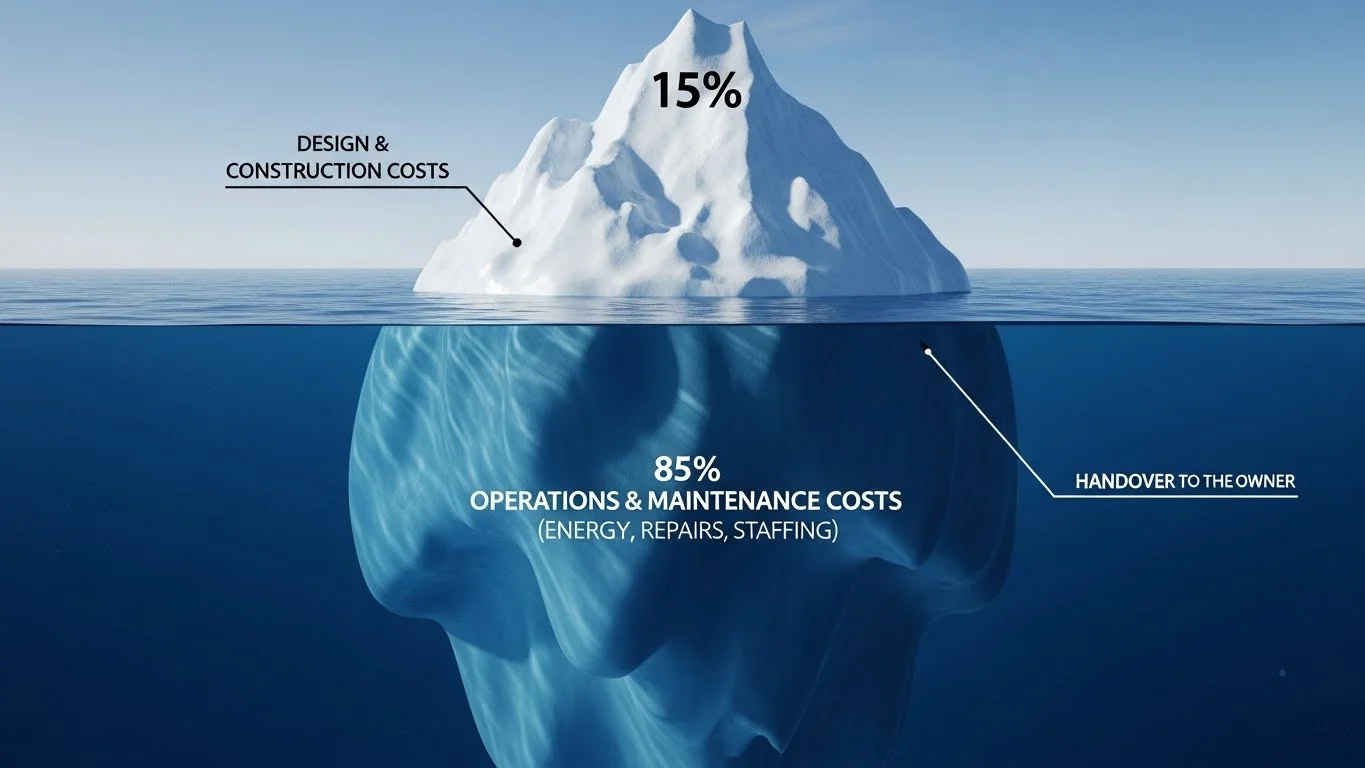
The Iceberg of Operational Costs
When a board of directors approves a capital project, they often fixate on the initial price tag—the $100 million construction budget. This is the "tip of the iceberg," visible and immediate. However, studies on the long-term costs of owning and using buildings reveal a different story.
- The 15% Visibility: Design and Construction typically account for only about 15% to 20% of the total cost of a building over a standard 50-year lifecycle. This includes all architectural fees, engineering, materials, and labour.
- The 85% Reality: The submerged portion of the iceberg—Operations and Maintenance (O&M)—accounts for the remaining 80% to 85%. This includes energy consumption, cleaning, repairs, equipment replacement, insurance, taxes, and capital renewal.
- The Investment Disconnect: Despite O&M representing the vast majority of the lifecycle cost, roughly 95% of the data investment occurs during the design and construction phase. We spend millions developing hyper-accurate models to coordinate pipes and ducts during construction, only to "flatten" that intelligence into dumb PDFs at handover. We are effectively throwing away the GPS navigation system we built and handing the owner a paper map.
The Interoperability Tax
In 2004, the National Institute of Standards and Technology (NIST) published a landmark study (GCR 04-867) estimating that inadequate interoperability costs the U.S. capital facilities industry $15.8 billion annually.

- Defining the Loss: For a facility manager, "interoperability cost" is not an abstract software concept; it is the time wasted searching for information. It is the "information hunting" tax.
- The "Valve in the Ceiling" Scenario: Consider a facility technician
responding to a leak in a ceiling on the 4th floor.
- Traditional Workflow: The technician walks to the physical plan room, digs through flat files to find the plumbing drawings, realizes the drawings are from the original 1990 construction and don't show the 2010 renovation, guesses where the isolation valve might be, walks back to the site, sets up a ladder, removes ceiling tiles, finds nothing, and repeats the process.
- The Cost: This "hunting" accounts for hours of wasted labour per work order. If a technician handles 500 work orders a year, and spends one hour per order searching for data, that is 500 hours of pure waste—wages paid for no value.
- The BIM Solution: BIM eliminates the search. By linking the data directly to the spatial model, the technician can pull up the room on an iPad, see through the ceiling using the model, locate the valve, click on it to see the tag number, and identify exactly which room it isolates—all before climbing a ladder. We shift labour from searching to fixing.
Redefining Deliverables: Artifacts vs. Constants
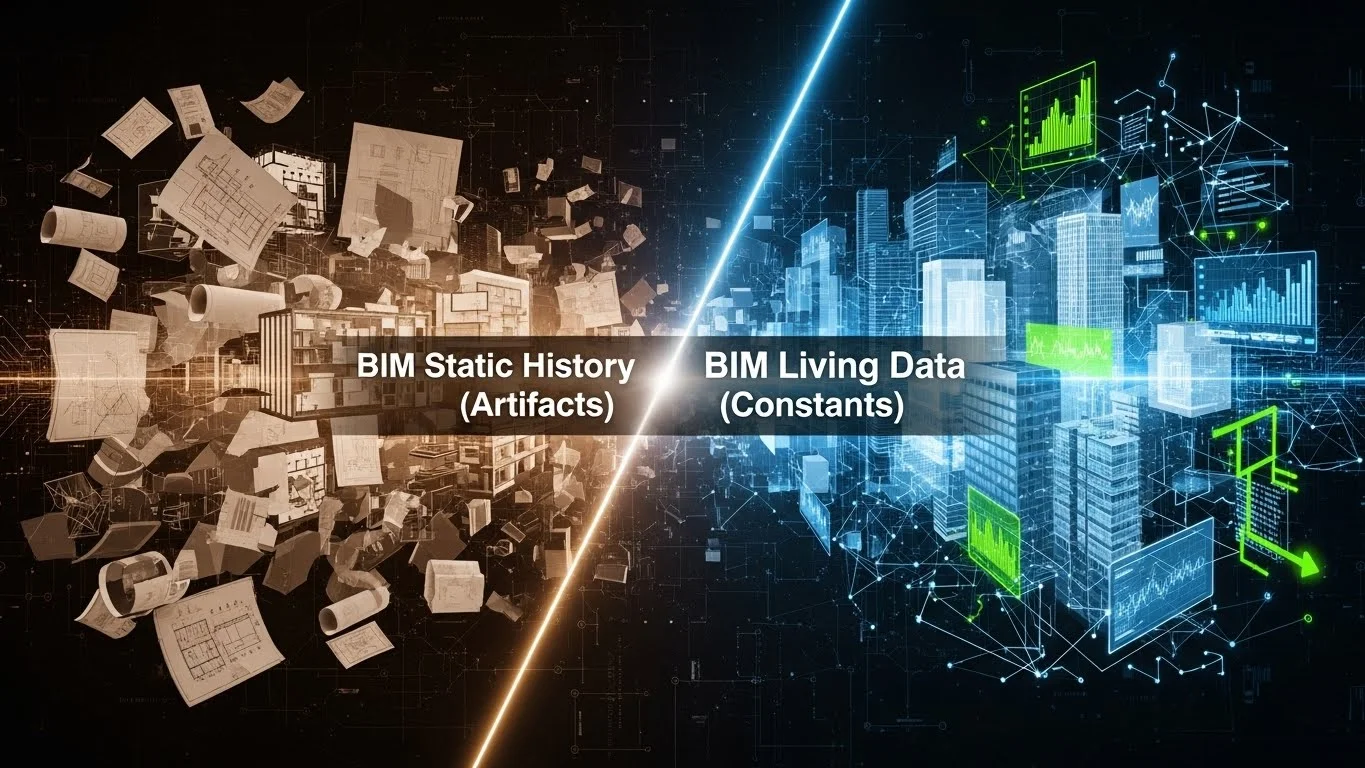
The traditional "Closeout Package" fails because it treats all information as equal. It dumps permits, warranties, submittals, and drawings into the same bucket. To fix this, we must categorize data into two distinct buckets based on how the data behaves over time: Artifacts and Constants.
1. Artifacts: The Static History of the Build
Artifacts are documents that record a specific point in time. They are historical records. Once created, they do not change; they only age.
- Examples: The original building permit, the soil test report, the signed contract, the commissioning report, the specific RFI (Request for Information) regarding a design change, and progress photos.
- The Role of Artifacts: These documents are crucial for liability, legal defence, and historical context. However, they are rarely used for daily operations. A facility manager does not need to read the soil compaction report to change a lightbulb or reset a breaker.
- Storage Strategy: Artifacts should be archived in a Document Management System (DMS) or a cloud repository. They should be indexed and searchable (e.g., by date or discipline), but they do not necessarily need to be embedded deeply into the active BIM model. They are the "library" of the building.
2. Constants: The Living Data
Constants represent the current state of the facility. This data is fluid, dynamic, and must be updatable. If this data is static, it becomes wrong.
- Examples: The location of a fire valve, the model number of a pump, the room number, the department occupying a space, the square footage of a floor, and the "Last Service Date" of an air handler.
- The Role of Constants: This is the data used for daily decision-making. If a wall is moved during a tenant improvement project, the "room area" constantly changes. If a pump is replaced, the "serial number" constantly changes. If this data is locked in a PDF, it cannot be easily updated, and the facility manager begins to distrust the documentation.
- Storage Strategy: This data belongs in the Record Model and the CMMS. It must be "live." The BIM model serves as the visual database for these constants.
The Hybrid Handover Strategy
Owners should stop asking for "The BIM Model" as a generic deliverable. That request is too vague. Instead, owners should specify a Hybrid Handover:
- The Visual Interface (The Model): The 3D geometry serves as the "file folder" for the building. Instead of navigating a directory of folders (Drive > Projects > O&M > Mechanical > Level 1), the user navigates the building visually. They walk into the virtual mechanical room and click on the pump.
- Linked Data: When the user clicks that pump, the model acts as a portal.
- It displays the Constants (live database properties like Flow Rate, RPM, Voltage) directly in the properties palette.
- It provides hyperlinks to the Artifacts (the original approved submittal PDF, the installation manual, the startup report) stored in the DMS.
- Diagram Idea: A conceptual image showing a 3D model of a pump. An arrow points from the pump to a "Properties Window" showing live data (Constants). Another arrow points to a "Links Window" showing PDF icons (Artifacts).
The Record Model (As-Built)
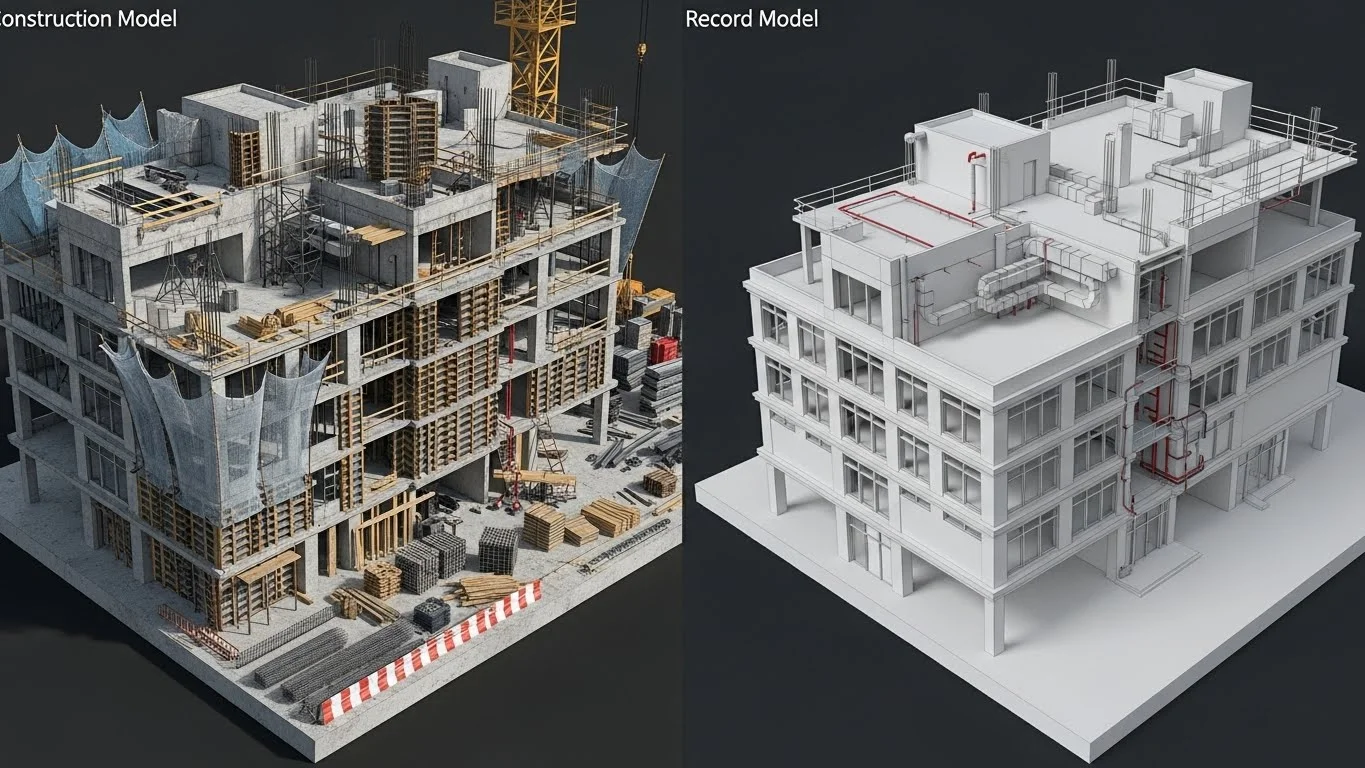
There is a significant difference between a "Design Model," a "Construction Model," and a "Record Model." Confusing them leads to owner dissatisfaction and bloated files that crash facility management computers.
Defining the Record Model
A Record Model is a clean, simplified version of the construction model, updated to reflect the actual installed conditions. It is purpose-built for operations.
- Geometry Clean-Up: A construction model is heavy. It contains fabrication details that the FM team does not need, such as beam copes, connection bolts, rebar congestion, and temporary work safety rails. A Record Model should be "lightweight." Hidden internal parts of equipment (like the impeller inside a pump) should be removed to ensure the model opens quickly on a tablet in the field.
- Accuracy Verification: As discussed in Optimizing Model Coordination, laser scanning is used to verify that the model geometry matches the physical reality. A Record Model that shows a valve 3 feet away from its actual location is worse than useless—it is dangerous. If a plumber cuts into a wall based on the model and hits a gas line that was actually 12 inches to the left, the trust in the system evaporates.
Who Creates the Record Model?
Determining who is responsible for the Record Model is a contractual minefield that must be navigated during the "Hub" (Strategy) phase.
- Option A: The Architect: Traditionally, the architect provides "Record Drawings." However, the architect is rarely on-site enough to verify the final millimetre-level deviations of pipe runs. They rely on "red lines" from the contractor. If the architect creates the Record BIM, they are usually just updating their design model based on markups, which lacks the fabrication-level detail the owner might want.
- Option B: The Contractor: The contractor knows what was built. They hold the fabrication models (LOD 400). However, contractors are builders, not database managers. They often struggle to clean up the models and standardize the data parameters for the owner's specific needs.
- Option C: The Third-Party Specialist: A growing trend is for owners to hire a dedicated "BIM Closeout Consultant." This neutral party takes the red lines and laser scans from the contractor and the design models from the architect. They act as the "Data Janitor," cleaning, merging, and standardizing the model to ensure strict adherence to the owner's data dictionary. This often yields the highest quality result.
Data Integration: The "I" in BIM
The geometry is secondary to the data. The Record Model must contain specific parameters useful for FM.
- COBie (Construction Operations Building Information Exchange): COBie is the international standard for moving data from BIM to FM. It is essentially a spreadsheet schema that organizes the data (Contact, Facility, Floor, Space, Component, Type). It allows data to be exported from Revit and imported into software like Maximo or TMA Systems.
- The "Bicycle Assembly" Analogy: In the book BIM and Construction Management, the authors compare BIM data to bicycle instructions. Most instructions tell you where a part goes (Geometry). A more sophisticated set might tell you the metal alloy of the frame (Design Data). But the owner needs to know the tire pressure, the chain oil type, and the warranty expiration. The Record Model must contain this operational metadata.
- Key Parameters: For a specific Air Handling Unit (AHU), the Record Model
parameters should include:
- Manufacturer: Trane
- Model Number: T-Series-500
- Serial Number: 8923-XJ-22
- Installation Date: 2023-11-15
- Warranty Expiration: 2025-11-15
- Filter Type: MERV-13 (Critical for ordering spares)
- Serving Zone: 3rd Floor East
- Asset Tag: AHU-03-01 (This must match the physical barcode on the unit).
Integration with FM Systems
A BIM model sitting on a hard drive is an island. To be useful, it must connect to the systems the owner already uses, specifically the Computerized Maintenance Management System (CMMS) or Computer-Aided Facility Management (CAFM) tools (e.g., IBM Maximo, Archibus, FM:Systems).
The "GUID" Connection
How do we link a 3D object to a database entry? We use the GUID (Globally Unique Identifier).
- The Bridge: Every object in Revit has a GUID—a complex string of characters (e.g., a1b2c3d4-e5f6...) generated by the software. Unlike a room number or an asset tag, which humans might change or type incorrectly, the GUID never changes, even if the object is moved or renamed.
- The Workflow:
- We export the equipment list from the BIM model to the CMMS using COBie or a direct plugin.
- The CMMS creates a new asset entry for "AHU-03-01" and stores the BIM GUID in a hidden field.
- Bi-Directional Sync: When a technician updates the "Last Service Date" in the CMMS, the plugin can write that date back to the BIM model. Conversely, if a renovation architect moves the AHU in the model, the new room location updates in the CMMS.
Commissioning and the "Born Digital" Asset
The best time to populate the CMMS is not after handover, but during construction. This concept is often called "Born Digital."
- iPad Commissioning: As discussed in Bridging the Gap, commissioning agents can use iPads to fill out checklists. This data (airflow rates, amp readings, pass/fail status) is collected digitally in the field.
- Data Flow: Instead of this data sitting in a separate "Commissioning Report" PDF, it should flow directly into the Record Model parameters.
- Day One Readiness: By the time the keys are handed over, the CMMS is already populated. The facility manager can log in on "Day One" and see a fully populated maintenance schedule for the year, rather than spending the first six months manually data-entering assets from paper binders.
RFID and Asset Tracking
Technology has redefined asset linking through RFID (Radio Frequency Identification) tags.
- Beyond Barcodes: While barcodes require a line-of-sight scan, RFID tags can be read from a distance.
- The Use Case: An RFID tag is placed on a VAV box located above the ceiling. The facility manager walks down the hallway with a scanner. The scanner "pings" the tag through the ceiling tiles, identifies the unit, and pulls up the maintenance history on the tablet.
- Linking to BIM: In the BIM database, the Asset ID matches the RFID signal. This allows the user to see the hidden unit on their screen (via Augmented Reality) and access its data without ever opening the ceiling.
Maintaining the Model: Preventing Digital Decay
A major risk in BIM for FM is Digital Decay. This occurs when the physical building changes, but the model does not. If a facility manager moves a wall or replaces a pump but fails to update the model, the model becomes inaccurate. Once accuracy drops below a certain threshold (often as little as 5-10%), the users stop trusting it, and the model dies.
The Renovation Protocol
To prevent decay, the owner must institute a strict Renovation Protocol.
- Checkout System: The Record Model is the "Single Source of Truth." When a renovation project begins, the architect must "check out" the relevant portion of the Record Model.
- Mandatory Updates: The contract must state that the architect/contractor is required to update the model with the new conditions and "check in" the updated model upon completion.
- Small Works: For small changes (e.g., moving a door), the in-house FM staff needs a "BIM Lite" tool—easy-to-use software that allows them to make minor geometry changes without needing to be Revit experts.
The Future: Digital Twins and IoT
We are moving toward a future where the model is not just a database of static properties, but a living Digital Twin connected to the Internet of Things (IoT).

- Sensors: Buildings are increasingly filled with sensors (thermostats, occupancy sensors, vibration sensors on pumps).
- The Visualization: A Digital Twin connects these live sensor feeds to the BIM geometry. A facility manager looks at the 3D model of the mechanical room. Instead of just seeing a grey pump, they see the pump glowing green (operating normally). If the vibration sensor detects a wobble, the pump glows red in the model and automatically triggers a work order in the CMMS.
- Predictive Maintenance: This shifts FM from "Preventive" (changing oil every 6 months whether it needs it or not) to "Predictive" (changing oil because the sensor data indicates wear). This is the ultimate realization of the lifecycle value of BIM.
Conclusion: The Long Game
The "Lifecycle of Information" does not end; it cycles. The data created in Design (Hub) is analyzed in Preconstruction, built in the Field, coordinated for Fabrication, and finally handed over for Operations.
For the owner, the value of BIM is not in the collision-free pipes or the pretty renders used during design. The value is in the Structured Data. It is the ability to answer questions instantly: "How many square feet of carpet do we have to replace?" "Which valves isolate the 4th floor?" "Is this motor still under warranty?"
By demanding a robust Record Model, distinguishing between Artifacts and Constants, and integrating BIM with FM systems, owners transform their facility from a passive liability into an active, intelligent asset. They stop paying the "Interoperability Tax" and start reaping the dividends of the Digital Age. They stop running the marathon blindly and start running it with a GPS, a heart-rate monitor, and a clear map of the road ahead.